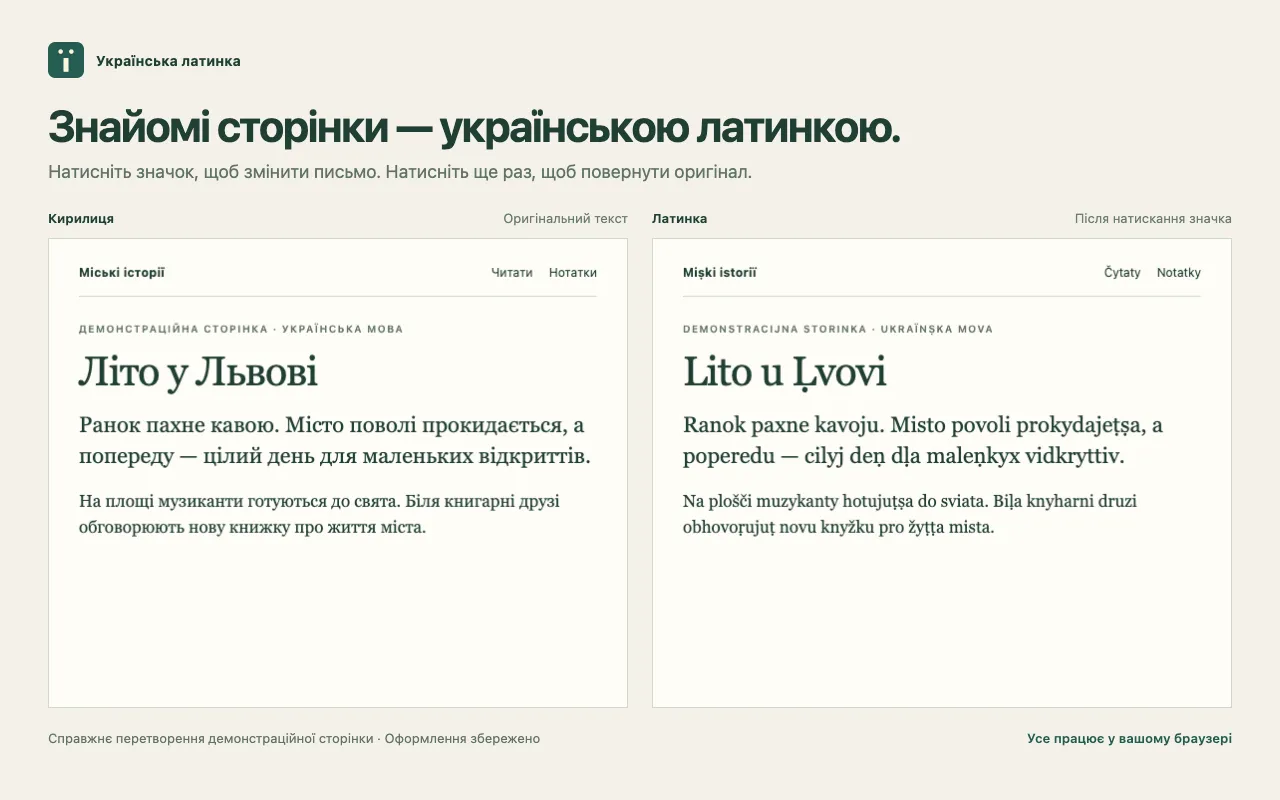
Ukrainian Latynka is now available in the Chrome Web Store. I built it to make reading Ukrainian in Latin script something you can try on the pages you already visit. Click the ï icon to convert the text; click it again to restore the original.
The language, meaning, links, and page design stay in place. The extension changes the script locally in your browser.
Read this post in Ukrainian Latin script.
A reading experiment on a real page
An alphabet table can show how letters correspond, but reading a whole article asks more of a spelling system. Familiar words appear in unfamiliar shapes. Long sentences reveal whether those shapes remain comfortable to follow. Navigation, headings, and small interface labels become part of the experience too.
The extension puts the alphabet into that everyday setting. There is no text box to paste an article into and no separate reading view. A normal click acts on the current page, so switching between the two scripts takes very little effort.
That also sets the scope of the project: it is a tool for reading. It does not translate Ukrainian into another language or provide a keyboard layout for writing Latin-script Ukrainian.
An alphabet with explicit choices
The extension uses version 0.1 of my Ukrainian Latin alphabet. It is a personal orthography for continuous text, with a published table, rules, and examples. It has no official status.
Some choices will look familiar: š, č, and ž represent ш, ч, and ж, while ï represents ї. Other choices need a little explanation. Lower marks indicate paired consonant softness where the written context calls for it. The letter i by itself does not add another mark.
For example, літо → lito, сіль → siḷ, and люди → ḷudy. The distinction between б’ю → bju and бюро → biuro is deliberate, as is свято → sviato. These examples show why converting text requires context as well as a letter table.
The alphabet reference contains all 33 Cyrillic letters, the softness rules, and 114 reference examples. The accompanying research article explains the historical context and the tradeoffs behind this particular system. Both pages are in Ukrainian.
Working with a page that keeps changing
A web page may split one word across several elements, emphasize its middle with bold text, or load another paragraph after you start reading. The extension handles text across inline elements and watches for newly added content while preserving the page’s elements, links, and styling.
It works with ordinary text in the main document, including headings, navigation, button labels, and the tab title. Input fields, editors, and code are left alone. If a site updates some text, that new content becomes the basis for subsequent conversion and restoration.
Language detection also matters. The normal mode uses language information and Chrome’s local detector to select Ukrainian text. Detection can miss a fragment, so the context menu includes a mode that applies the Ukrainian table to all eligible Cyrillic text. That mode follows the same page restrictions as normal conversion.
Restoration means keeping the original
The second click restores saved text. It does not try to reconstruct Cyrillic by reversing the Latin spelling.
This is an important part of the design because conversion can lose distinctions. Different Cyrillic sequences can produce the same Latin sequence, and different apostrophe characters can disappear into the same result. Keeping the original allows the extension to return the exact saved characters instead of guessing.
The originals stay in the document’s memory. If you copy text while Latin mode is active, you copy the visible Latin text; switch the extension off first when you need Cyrillic.
Local processing and a choice of sites
The extension processes text locally. It sends neither page text nor your list of selected sites to the developer or an external conversion service, and it contains no advertising, analytics, or telemetry.
Manual use starts with a click on the icon. Automatic use is optional: right-click the icon, choose the command to always enable the extension on the current site, and approve the requested access. This setting applies to the exact host, so example.org and news.example.org are separate choices. Saved sites can be removed in the extension’s options.
The privacy policy and support page describe storage, permissions, and the available controls in more detail.
Try it on a page you already read
Install the extension from the store in Chrome 123 or newer, pin the ï icon, and open an ordinary Ukrainian web page. Click once to read it in Latin script and again to return to the original. There is no popup to open: the click itself is the action.
PDFs, embedded frames, Shadow DOM, canvas, text inside images, Chrome’s internal pages, and Chrome Web Store pages are outside the supported scope. Start with a regular article whose text you can select.
If a word looks wrong, a short example with the expected result is useful feedback. For a page problem, include your Chrome and extension versions and the steps needed to reproduce it. The support page explains how to send either kind of report.
Add Ukrainian Latynka to Chrome · Explore the project · Read the Ukrainian Latin version